SF Symbol has another special modifier to set variant for a symbol, it's called .symbolVariant . In order to understand this better, we gotta take a close look at collection of symbols in SF Symbol app.
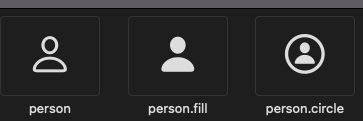
If we open SF Symbol app and search for “person”, we get three variants as shown below.
Usually, when we want to render an image, we take the name from SF Symbol app and use it like this 👉 Image(systemName: “person.circle”) and this will render an image with person with circle around it. With the help of symbolVariant modifier we can request image’s other variant.
Note that both Image views are rendering person with circle around it but for the second Image view, we are using symbolVariant. It’s a convenient way of rendering other variations of symbol.
Available options are:
none
circle
square
rectangle
fill
slash
Benefit of using symbolVariant over string based fully resolved name is that if the symbol is not available, symbolVariant will render generic version of that symbol whereas in case of string based image name, image will not render at all.
Shown below is the example where we are trying to render person.square and notice how string based doesn’t render anything vs symbolVariantbased Image view renders person image on screen.