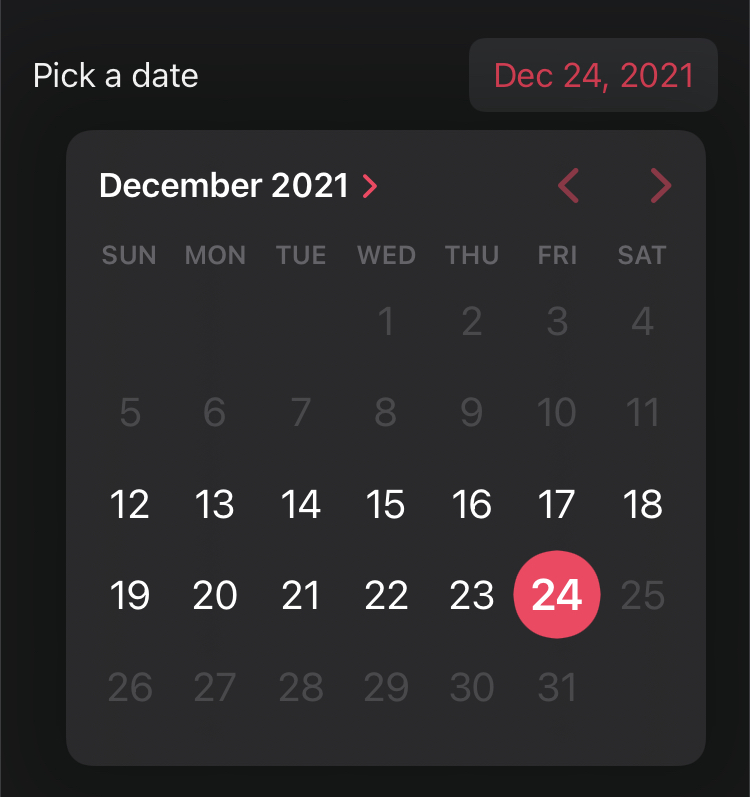
We can limit the DatePicker to specific ranges of dates, allowing date selections only before or, after a certain date, or between two dates.
Let’s update our example to show a date picker that only permits selections starting the current date which will restrict the selection of dates before the current day.
struct DatePickerExample: View {
    @State private var date = Date()

    var body: some View {
        DatePicker(
            "Pick a date",
            selection: $date,
            in: Date()...,
            displayedComponents: [.date])
            .padding()
    }
}
Alternatively, we can choose to limit date selection to current date meaning no future date selection is allowed.
struct DatePickerExample: View {
    @State private var date = Date()

    var body: some View {
        DatePicker(
            "Pick a date",
            selection: $date,
            in: ...Date(),
            displayedComponents: [.date])
            .padding()
    }
}
We can even allow selection between two dates.
struct DatePickerExample: View {
    @State private var date = Date()

    var body: some View {
        DatePicker(
            "Pick a date",
            selection: $date,
            in: Date().addingTimeInterval(-1000000)...Date(),
            displayedComponents: [.date])
            .padding()
    }
}
DateRange can also be created with specific dates in a variable and used in DatePicker view.
struct DatePickerExample: View {
    @State private var date = Date()
    let dateRange: ClosedRange<Date> = {
        let calendar = Calendar.current
        let startComponents = DateComponents(year: 2021, month: 12, day: 15)
        let endComponents = DateComponents(year: 2021, month: 12, day: 30, hour: 23, minute: 59, second: 59)
        return calendar.date(from:startComponents)!
        ...
        calendar.date(from:endComponents)!
    }()

    var body: some View {
        DatePicker(
            "Pick a date",
            selection: $date,
            in: dateRange,
            displayedComponents: [.date])
            .padding()
    }
}