- Sep 19, 2025
Trino vs. Presto vs. Spark SQL vs. DuckDB
- DevTechie Inc
- Data Engineering
SQL Engines Comparison Guide
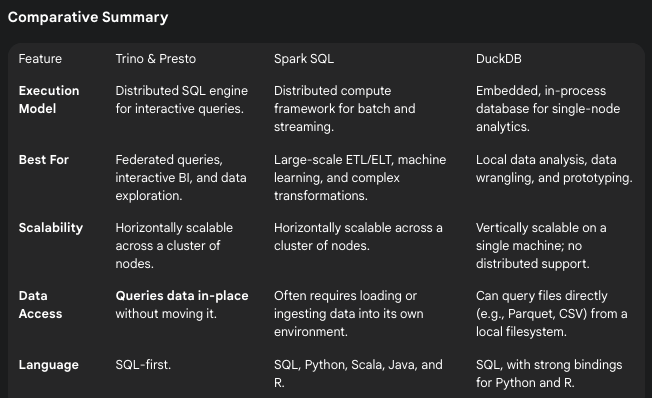
When working with large datasets, you need the right tool for the job. Here’s a breakdown of four popular SQL engines, each designed for different use cases and architectures.
Trino & Presto: Fast Query Engines for Data Federation
What they are: Distributed SQL query engines optimized for interactive analytics across multiple data sources.
Key Architecture:
Run queries directly on data where it lives (no data movement required)
Support federated queries across different systems (S3, databases, data lakes)
Master-worker cluster architecture with coordinator and worker nodes
Memory-based processing for fast results
Performance Characteristics:
Excellent for low-latency, ad-hoc queries (seconds to minutes)
Optimized for read-heavy analytical workloads
Limited fault tolerance — queries fail if nodes go down
Best performance on hot data (frequently accessed)
Ideal Use Cases:
Business intelligence and reporting dashboards
Data exploration and discovery across multiple sources
Interactive analytics where users need quick answers
Data lake analytics without ETL processes
When to choose: You need fast SQL queries across distributed data sources without moving data around.
Spark SQL: Comprehensive Data Processing Framework ⚙️
What it is: A SQL interface built on top of Apache Spark, a general-purpose distributed computing engine.
Key Architecture:
Part of the broader Spark ecosystem (not just SQL)
Uses Resilient Distributed Datasets (RDDs) and DataFrames
Catalyst optimizer for query planning and optimization
Supports both SQL and programmatic APIs (Python, Scala, Java)
Performance Characteristics:
Higher startup latency due to JVM and cluster initialization
Excellent for complex, multi-stage batch processing jobs
Built-in fault tolerance with automatic recovery
Efficient for iterative algorithms and machine learning workloads
Ideal Use Cases:
ETL/ELT data pipelines and transformations
Machine learning feature engineering and model training
Streaming data processing (Structured Streaming)
Complex data processing workflows requiring multiple steps
When to choose: You need a comprehensive platform for data engineering, ML, and complex analytics beyond just querying.
DuckDB: High-Performance Analytical Database 🦆
What it is: An embedded, single-node analytical database optimized for OLAP workloads.
Key Architecture:
Runs in-process (like SQLite) — no separate server required
Columnar storage with vectorized query execution
Designed for single-machine analytics with multi-core optimization
Can handle datasets larger than memory through efficient disk spilling
Performance Characteristics:
Extremely fast for local analytical queries
Zero network overhead since it’s embedded
Efficient memory usage and CPU utilization
Limited by single-machine resources
Ideal Use Cases:
Data analysis in notebooks (Jupyter, R Markdown)
Local data exploration and prototyping
Analytical applications requiring embedded database
Processing large files (Parquet, CSV) on workstations
When to choose: You’re doing analytical work on a single machine and want maximum performance without distributed complexity.
Performance difference between Trino and PrestoDB
While Trino and Presto originated from the same codebase, their development paths diverged after a fork in 2019, leading to specific performance differences. The key distinction lies in their focus: Trino has evolved with a faster development cycle and a focus on enterprise-grade optimizations for more complex and modern workloads, while PrestoDB has historically focused on stability and lightweight analytics.
Here are the specific performance differences:
Query Performance for Complex Workloads: Trino generally outperforms PrestoDB on complex, multi-stage queries, especially those common in modern ETL/ELT pipelines and federated analytics. The faster development pace of the Trino community has introduced advanced optimizations like dynamic filtering, join reordering, and a more robust cost-based optimizer. These features allow Trino to create more efficient query plans, which is a significant advantage when querying across diverse and large datasets.
Performance for Ad-Hoc Queries: For smaller, lightweight, ad-hoc queries, both engines are exceptionally fast. PrestoDB was originally designed for this exact use case (interactive analytics at Facebook), and its in-memory query execution and simple architecture allow it to deliver low-latency results. In many cases, it can be 10–100 times faster than Hadoop’s MapReduce for quick lookups. Trino matches this performance and, due to its ongoing optimizations, often surpasses it, particularly when dealing with complex joins or large data volumes.
Fault Tolerance: Trino has introduced a fault-tolerant execution mode that allows it to continue a query even if a worker node fails. This makes it more suitable for running long-running ETL jobs that are more susceptible to temporary failures. PrestoDB lacks this feature, which can cause long-running queries to fail entirely, requiring a full restart.
Connector and Data Source Performance: Trino has a more extensive and rapidly evolving connector ecosystem. The constant development on specific connectors, like those for cloud object storage (e.g., S3), has led to performance improvements through features like S3-select pushdown, which sends some of the filtering and projection logic directly to the storage layer, reducing data transfer and latency.
Concurrency: Both engines are built for high concurrency due to their stateless, massively parallel processing (MPP) architecture. They can handle many simultaneous users and queries without degradation, a core feature that distinguishes them from frameworks like Spark. However, Trino’s ongoing development and enhanced workload management features give it an edge in large-scale enterprise environments with hundreds of concurrent users.
Trino Connectors: The Universal Data Translator 🔌
Think of Trino as a smart translator who can speak to any type of data storage system. The way it does this magic is through connectors — special adapters that help Trino understand different “languages” that various databases and storage systems use.
What Are Connectors? 🤔
Imagine you want to ask questions to friends who speak different languages:
One friend speaks English (SQL databases)
Another speaks French (NoSQL databases)
Another speaks Japanese (cloud storage files)
Trino connectors work like universal translators. You ask your question in standard SQL (which is like speaking English), and the connector translates it so each system can understand and respond.
The Big Advantage: You don’t need to move your data or learn different query languages. Everything stays where it is, and you use familiar SQL for everything.
Types of Connectors 📂
1. Data Lake & Cloud Storage Connectors ☁️
These help you work with files stored in the cloud
What they connect to: Large files stored in cloud services like Amazon S3, Google Cloud, or Azure
Key Players:
Apache Iceberg: Works with organized data tables that keep a history of changes (like a version control for data)
Delta Lake: Connects to data organized by Databricks and similar platforms
Apache Hudi: Another way to organize large datasets with update capabilities
Hive: The “old reliable” that works with traditional big data setups
Real-world example: “Show me sales data from all the CSV and Parquet files stored in our company’s Amazon S3 bucket, even though they’re organized in different folders by date.”
2. Traditional Database Connectors 🗄️
These connect to regular databases that companies have used for years
What they connect to: Standard business databases where companies store their day-to-day operational data
Key Players:
PostgreSQL, MySQL, SQL Server, Oracle: The most common business databases
Amazon Redshift: Amazon’s data warehouse
Snowflake: A popular cloud data warehouse
Real-world example: “Join customer information from our PostgreSQL database with sales data from our MySQL database, plus financial data from Oracle — all in one query.”
3. Specialized & Modern Data Sources 🚀
These connect to newer types of data systems
What they connect to: Different types of databases and data streams that aren’t traditional tables
Key Players:
Apache Kafka: Real-time streaming data (like live website clicks or sensor readings)
Elasticsearch/OpenSearch: Search engines that store and find text documents quickly
MongoDB: Document databases that store data like JSON files
Apache Cassandra: Databases built for massive scale
Google BigQuery: Google’s data warehouse
Prometheus: Systems that track performance metrics over time
Real-world example: “Show me real-time website activity from Kafka, combined with user profiles from MongoDB, and search logs from Elasticsearch.”
How This Helps You 💡
Before Trino (The Hard Way):
Export data from Database A → CSV file
Import CSV into Database B
Export data from Database B → another CSV
Import into your analytics tool
Wait hours for data to move around
Learn different query languages for each system
With Trino (The Easy Way):
Write one SQL query that mentions all your data sources
Get results in seconds
Data never moves from its original location
Use the same SQL you already know
Practical Examples 🛠️
E-commerce Company Scenario:
-- One query across multiple systems
SELECT
    customers.name,
    orders.total_amount,
    reviews.rating
FROM postgres.sales.customers
JOIN mysql.orders.order_data AS orders ON customers.id = orders.customer_id
JOIN s3.reviews.product_reviews AS reviews ON orders.product_id = reviews.product_id
WHERE orders.order_date >= '2024-01-01'
What’s happening: Trino is simultaneously talking to PostgreSQL (customer data), MySQL (order data), and S3 files (review data) to answer your question.
Real-time Analytics Scenario:
-- Combine live streaming data with historical data
SELECT
    kafka_stream.event_type,
    COUNT(*) as live_events,
    historical.avg_daily_events
FROM kafka.live.website_events AS kafka_stream
JOIN hive.warehouse.daily_summaries AS historical
    ON kafka_stream.event_date = historical.date
WHERE kafka_stream.timestamp > current_timestamp - interval '1' hour
What’s happening: Looking at live website events from Kafka while comparing them to historical averages stored in data lake files.
Why This Matters 🎯
For Data Analysts:
No more waiting for IT to export and import data
Use familiar SQL across all data sources
Get faster insights from distributed data
For Companies:
Avoid expensive data movement and duplication
Keep data in the systems that work best for each use case
Reduce storage costs and complexity
For Developers:
One query interface instead of learning multiple APIs
Faster development of analytics applications
Easier data integration projects
The Smart Approach: Use Multiple Tools Together 🤝
Old thinking: “Pick one tool and use it for everything” New thinking: “Use the best tool for each job”
Modern companies are building data tool ecosystems where each tool does what it’s best at:
🔧 Databricks = The Heavy-Duty Workshop
What it’s for: Building and processing data, AI/ML projects
Best at: Complex data work, machine learning, handling messy data
Think of it as: The workshop where you build and fix things
🏢 Snowflake = The Fast Report Center
What it’s for: Business reports and dashboards
Best at: Fast answers to business questions, easy for non-technical users
Think of it as: The office where managers get quick reports
🌉 Trino = The Universal Connector
What it’s for: Asking questions across all your data sources at once
Best at: Connecting different systems without moving data
Think of it as: The bridge that connects all your data islands
Quick Decision Guide 🤔
Choose Databricks if you need to:
✅ Build complex data pipelines and AI models
✅ Work with messy, unstructured data (images, text, videos)
✅ Have technical teams who write code
✅ Do machine learning and advanced analytics
Choose Snowflake if you need to:
✅ Create business reports and dashboards quickly
✅ Work mainly with clean, organized data
✅ Support many business users who prefer simple interfaces
✅ Want something that “just works” with minimal maintenance
Add Trino if you need to:
✅ Query data from multiple different systems at once
✅ Get fast answers without moving data around
✅ Connect Databricks, Snowflake, and other tools together
✅ Avoid being locked into one vendor
Real-World Example 🏪
E-commerce Company Setup:
📊 Business dashboards → Snowflake (fast reports for managers)
     ↑
🌉 Trino (connects everything for analysts)
     ↑
🔧 Databricks (processes raw data, builds recommendation AI)
What happens:
Databricks processes customer clicks and builds recommendation models
Snowflake stores clean sales data for fast business reports
Trino lets analysts query both systems together for insights
Getting Started Tips 🚀
Start Simple: Begin with connectors to databases you already know
Test Small: Try queries on small datasets first to understand performance
Plan Your Architecture: Think about where your most important data lives
Monitor Performance: Some connectors are faster than others for different types of queries
Remember: Trino’s superpower is making all your different data sources look like they’re one big, unified database — even though the data never actually moves!