- Nov 6, 2024
Python: try … except … else and try … finally
- DevTechie
In Python, exception handling allows you to gracefully handle errors or unexpected situations that might occur during program execution. Let’s dive a little deeper into exception handling with this article. The article explains usage of elseandfinally clauses with the try … except construct.
try … except … else
Consider the below code which does some calculation in try block based on user input. The try block statement may run into errors. Different except blocks handle different errors (exceptions). The else block does the job of printing the result of the calculation when there is no error in the try block. The code inside the else block may need to be moved within the try block if you are not using the else block.
Code:
total_marks = 500
try:
        obtained_marks = eval (input ('Enter a number: '))
        result = total_marks/ obtained_marks #ZeroDivisionError


except ZeroDivisionError: # if user entered 0 for obtained_marks
        print ("You are trying to divide by 0. Not possible!")

except NameError:     # if user entered a value other than 0 for obtained_marks
        print ("A name is not defined ")
else:
print ("Percentage result= ", 1/result * 100)Output :
Case — 1: When user enters 0 for the obtained marks (invalid input)
Enter a number: 0
You are trying to divide by 0. Not possible!
Case — 2: When user enters a character or string for the obtained marks (invalid input)
Enter a number: hi
A name is not defined
Case — 3: When user enters a valid integer value for obtained marks
Enter a number: 365
Percentage result=  73.00000000000001
You can conclude from the above code and output that the code which may produce an error is placed inside the tryblock. The except blocks handle (process) each possible exception. The else block contains the code which must be executed when there is no exception. The else block code runs when try block is executed successfully i.e. raised no exception.
else block is optional.
Each try block must have at least one matching except block, even if the except block has only pass statement.
Many except blocks are possible.
Unlike except block, there can only be one else block for a try block.
Pictorially try … else construct can be represented as shown in the below image.

try … except … else construct
You can not omit except block even if you are using else block for a try block
try … finally OR try … except … finally
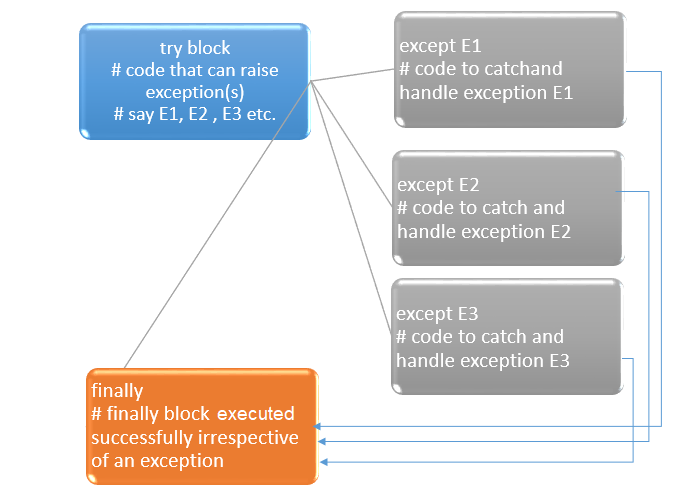
There is one more block which you can use with the try … except — the finally block. The statements in the finallyblock must be executed irrespective of an exception in the try block. This means that finally block code must be executed whether an exception occurs in the try block or not. So even if an exception occurs and your program crashes, the statements in the finally block will be executed.
Like else block, finally block is optional.
finally block always runs irrespective of an exception.
There can be only one finally block for a try … except block.
The below code demonstrates the finally block.
Code:
total_marks = 500
try:
        obtained_marks = eval (input ('Enter a number: '))
        result = total_marks/ obtained_marks #ZeroDivisionError
        print ("Percentage result= ", 1/result * 100)

except ZeroDivisionError: # if user entered 0 for obtained_marks
        print ("You are trying to divide by 0. Not possible!")

except NameError:     # if user entered a value other than 0 for obtained_marks
        print ("Some names are not defined ")
finally:
print ("This is the code inside finally block")Output:
Case — 1: ZeroDivisionError exception since 0 (zero) is input by user
Enter a number: 0
You are trying to divide by 0. Not possible!
This is the code inside finally blockCase — 2: NameError exception since string entered by user
Enter a number: hi
Some names are not defined
This is the code inside finally blockOutput — 3: None exception raised in the try block. The user enters a valid integer (350).
Enter a number: 350
Percentage result= 70.0
This is the code inside finally blockYou can observe
finallyblock runs always irrespective of any error (exception) within thetryblock.
The try … finally block is schematically represented in the below image.
try … finally
You can omit except block when giving finally block.
Either an except or finally block is necessary for a try block. So, you can omit a except block, if you are using finallyblock. However, omitting except block will not handle the exceptions in the try block and traceback will be shown to the user. The finally block will be executed in these cases also.
This is demonstrated by the below code (above code without except blocks).
Code:
total_marks = 500
try:
obtained_marks = eval (input ('Enter a number: '))
result = total_marks/ obtained_marks #ZeroDivisionError
print ("Percentage result= ", 1/result * 100)finally:
print ("This is the code inside finally block")Output:
Enter a number: hi
This is the code inside finally block
ERROR!
Traceback (most recent call last):
File "<main.py>", line 3, in <module>
NameError: name 'hi' is not definedtry … except … else … finally — A possible combo
Oh! Do not be confused, else block and finally block are not mutually exclusive. You can use both else and finally with the same try ... except block since they serve different purposes.
else block executes when try block runs without an error whereas finally block runs always.
The below code is the modified version of the above code which uses both else and finally block.
Code:
total_marks = 500
try:
obtained_marks = eval (input ('Enter a number: '))
result = total_marks/ obtained_marks #ZeroDivisionError
except ZeroDivisionError: # if user entered 0 for obtained_marks
print ("You are trying to divide by 0. Not possible!")
except NameError: # if user entered a value other than 0 for obtained_marks
print ("A name is not defined ")else:
print ("Percentage result= ", 1/result * 100)
finally:
    print ("This is the code inside finally block")
Output:
Case — 1: ZeroDivisionError exception since 0 (zero) is input by user
Enter a number: 0
You are trying to divide by 0. Not possible!
This is the code inside finally block
Case — 2: NameError exception since string entered by user
Enter a number:hi
A name is not defined
This is the code inside finally block
Case — 3: None exception raised in the try block. The user enters a valid integer (350).
Enter a number: 355
Percentage result=  71.00000000000001 # due to else block
This is the code inside finally block
Why finally block?
The finally block executes in both cases — if an exception occurs and your program crashes or your program executes successfully. The above code prints a message within the finally block which serves the purpose of demonstration only. What could be the task which the finally block accomplishes in real applications.
An example is the code for closing a file. Now, the question is — why you cannot close a file in the try block. Suppose you open a file to write some text/data in it, if you close the file at the end of try block and not in the finally block, the program may crash due to exceptions and file never close since the try block code does not execute beyond the point of exception raised.
file = open ( 'filename.txt', 'w')
text = 'DevTechie'
try:
  # some code that could potentially fail goes here
  file.write(text)
finally:
  f.close()
try … finally block can be used for closing any resource after working on it.
try … finally block is used for resource management. finally block runs clean up code i.e. resource releasing code.
Recapitulate
The article explains two optional clauses — else and finally which can be used with try … except in exception handling. The finally block can be useful for effective resource handling.