- Apr 30, 2025
Mastering SwipeActions in SwiftUI
- DevTechie
- SwiftUI
Audio overview
Article
SwipeActions, introduced in iOS 15, is a powerful feature in SwiftUI that allows developers to create interactive list items with swipe gestures, similar to native apps.
In this comprehensive guide, we will dive into the basics and advanced use cases of SwipeActions in iOS.
SwipeActions is a modifier for list items that allows users to perform actions by swiping either from left or right on a row. This provides an intuitive and space efficient way to expose contextual actions without cluttering the main user interface.
Let’s start with a simple example using DevTechie course model.
struct Course: Identifiable, Hashable {
    let id = UUID()
    var name: String
    var price: String
    var lessons: Int
}
Let’s add courses provided by DevTechie.com for this example.
extension Course
{
    static let courses: [Course] = [
        Course(
            name: "Background Timer App in SwiftUI",
            price: "$9.99",
            lessons: 11
        ),
        Course(
            name: "iOS 18 HealthKit: Create Interactive Dashboards with SwiftUI",
            price: "$9.99",
            lessons: 15
        ),
        Course(
            name: "Build a Powerful Document Scanner with SwiftUI in iOS 18 : A Complete Guide",
            price: "$9.99",
            lessons: 14
        ),
        Course(
            name: "Weather App using CoreLocation, URLSession, UIKit, iOS 18",
            price: "$9.99",
            lessons: 11
        ),
        Course(
            name: "Mini Apps in iOS",
            price: "$9.99",
            lessons: 3
        ),
        Course(
            name: "Build Exchange Rate App: SwiftUI, iOS 18, Combine, MVVM",
            price: "$9.99",
            lessons: 10
        ),
        Course(
            name: "Practical SwiftData in SwiftUI & iOS 17",
            price: "$9.99",
            lessons: 38
        ),
        Course(
            name: "Building Complete Goals App in SwiftUI 5 & iOS 17",
            price: "$9.99",
            lessons: 35
        ),
        Course(
            name: "Mastering PhaseAnimation in SwiftUI 5 & iOS 17",
            price: "$9.99",
            lessons: 6
        ),
        Course(
            name: "ScrollViews in iOS 17 & SwiftUI 5",
            price: "$9.99",
            lessons: 14
        ),
        Course(
            name: "Mastering CoreImage in UIKit",
            price: "$9.99",
            lessons: 13
        ),
        Course(
            name: "Build Complete TaskList App in UIKit, CoreData, MVVM, Lottie",
            price: "$9.99",
            lessons: 22
        ),
        Course(
            name: "Favorite Places App in iOS, SwiftUI, MVVM, CoreData",
            price: "$9.99",
            lessons: 19
        ),
        Course(
            name: "Build WatchOS Timer App in SwiftUI 4 using MVVM",
            price: "$9.99",
            lessons: 10
        ),
        Course(
            name: "SwiftUI Graphics Programming With Example",
            price: "$9.99",
            lessons: 7
        ),
        Course(
            name: "Birthday App using Core Data with CRUD : iOS 16 & Swift UI 4",
            price: "$9.99",
            lessons: 16
        ),
        Course(
            name: "Mastering WidgetKit in SwiftUI 4, iOS 16",
            price: "$9.99",
            lessons: 145
        ),
        Course(
            name: "Mastering Charts Framework in SwiftUI 4 & iOS 16",
            price: "$9.99",
            lessons: 34
        ),
        Course(
            name: "Photo Gallery App in SwiftUI 4, iOS 16 & PhotosPicker",
            price: "$9.99",
            lessons: 10
        ),
        Course(
            name: "What's in in SwiftUI 4: Learn by Building 15 Examples",
            price: "$9.99",
            lessons: 15
        ),
        Course(
            name: "Introducing Maps in SwiftUI using MapKit",
            price: "$9.99",
            lessons: 9
        ),
        Course(
            name: "Complete E-Commerce App in SwiftUI 3, iOS 15 and Apple Pay",
            price: "$9.99",
            lessons: 17
        ),
        Course(
            name: "Food Recipes App in SwiftUI 3 & iOS 15 with Lottie Animation",
            price: "$9.99",
            lessons: 17
        ),
        Course(
            name: "Build Strava Clone in iOS using MapKit, Realm and UIKit",
            price: "$9.99",
            lessons: 16
        ),
        Course(
            name: "Top Destinations App in SwiftUI w/ Maps & Lottie Animation",
            price: "$9.99",
            lessons: 12
        ),
        Course(
            name: "Complete Reference for Text View in SwiftUI 3 and iOS 15",
            price: "$9.99",
            lessons: 28
        ),
        Course(
            name: "HealthKit Integration in SwiftUI",
            price: "$9.99",
            lessons: 10
        ),
        Course(
            name: "DevTechie Video Courses App in SwiftUI, AVPlayer, MVVM, iOS",
            price: "$9.99",
            lessons: 12
        ),
        Course(
            name: "Pantry Management App using MVVM, SwiftUI 2, iOS 14, Firebase Firestore and Analytics",
            price: "$9.99",
            lessons: 18
        ),
        Course(
            name: "Pantry Management App using MVVM, SwiftUI 3, iOS 15 & Firebase",
            price: "$9.99",
            lessons: 17
        ),
        Course(
            name: "Mastering SwiftUI 3: iOS App Development Bootcamp",
            price: "$9.99",
            lessons: 61
        ),
        Course(
            name: "iOS 15 Widgets in SwiftUI 3 & WidgetKit",
            price: "$9.99",
            lessons: 10
        ),
        Course(
            name: "Disney Plus Clone in SwiftUI with Remote Url Video Player",
            price: "$9.99",
            lessons: 27
        ),
        Course(
            name: "Goals App: SwiftUI 3, iOS 15, Protocols, MVVM, Firebase",
            price: "$9.99",
            lessons: 21
        )
    ]
}
Within the view we will start with a State property to fetch all the courses.
struct SwipeActionsExample: View {
    @State private var courses = Course.courses
    var body: some View {
        NavigationStack {
            List {

            }
            .navigationTitle("DevTechie.com")
        }
    }
}
Let’s add ForEach view inside the list to display courses.
struct SwipeActionsExample: View {
    @State private var courses = Course.courses
    var body: some View {
        NavigationView {
            List {
                ForEach(courses) { course in
                    Text(course.name)
                }
            }
            .navigationTitle("DevTechie.com")
        }
    }
}
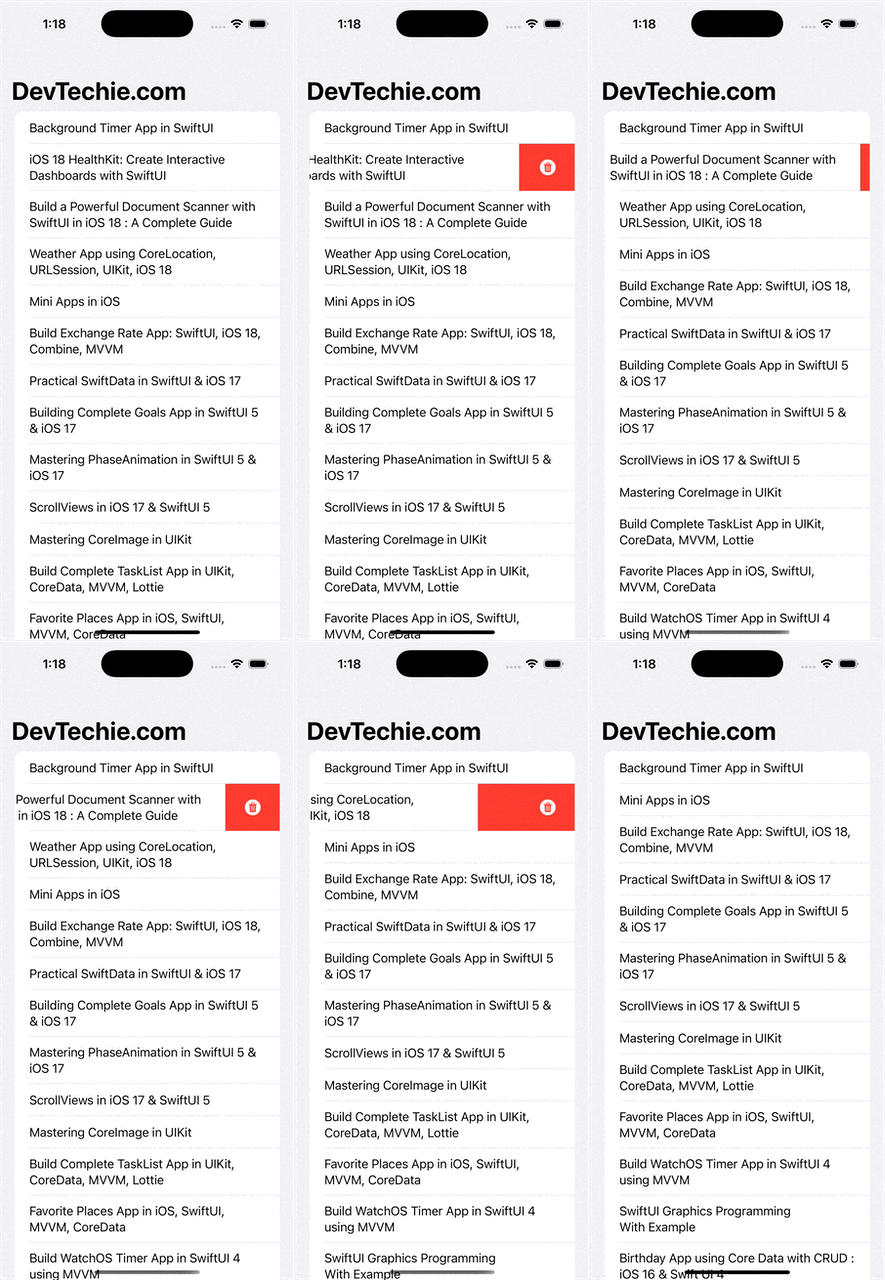
Let’s add a delete swipe action to this view. To do this, we’ll use the SwipeActions modifier, which takes a content closure as an argument. This closure will be responsible for removing the swiped item. To achieve this, we’ll create a Button view that will be displayed when the user swipes from the trailing edge.
struct SwipeActionsExample: View {
    @State private var courses = Course.courses
    var body: some View {
        NavigationView {
            List {
                ForEach(courses) { course in
                    Text(course.name)
                        .swipeActions {
                            Button(role: .destructive) {
                                if let index = courses.firstIndex(of: course) {
                                    courses.remove(at: index)
                                }
                            } label: {
                                Label("Delete", systemImage: "trash.circle.fill")
                            }
                        }
                }
            }
            .navigationTitle("DevTechie.com")
        }
    }
}
The swipeActions modifier offers additional options:
Edge: Specifies the edge where the swipe action will occur. If left unspecified, it defaults to the trailing edge.
AllowsFullSwipe: A boolean value indicating whether a full swipe will trigger the first action in the modifier. By default, it is set to true.
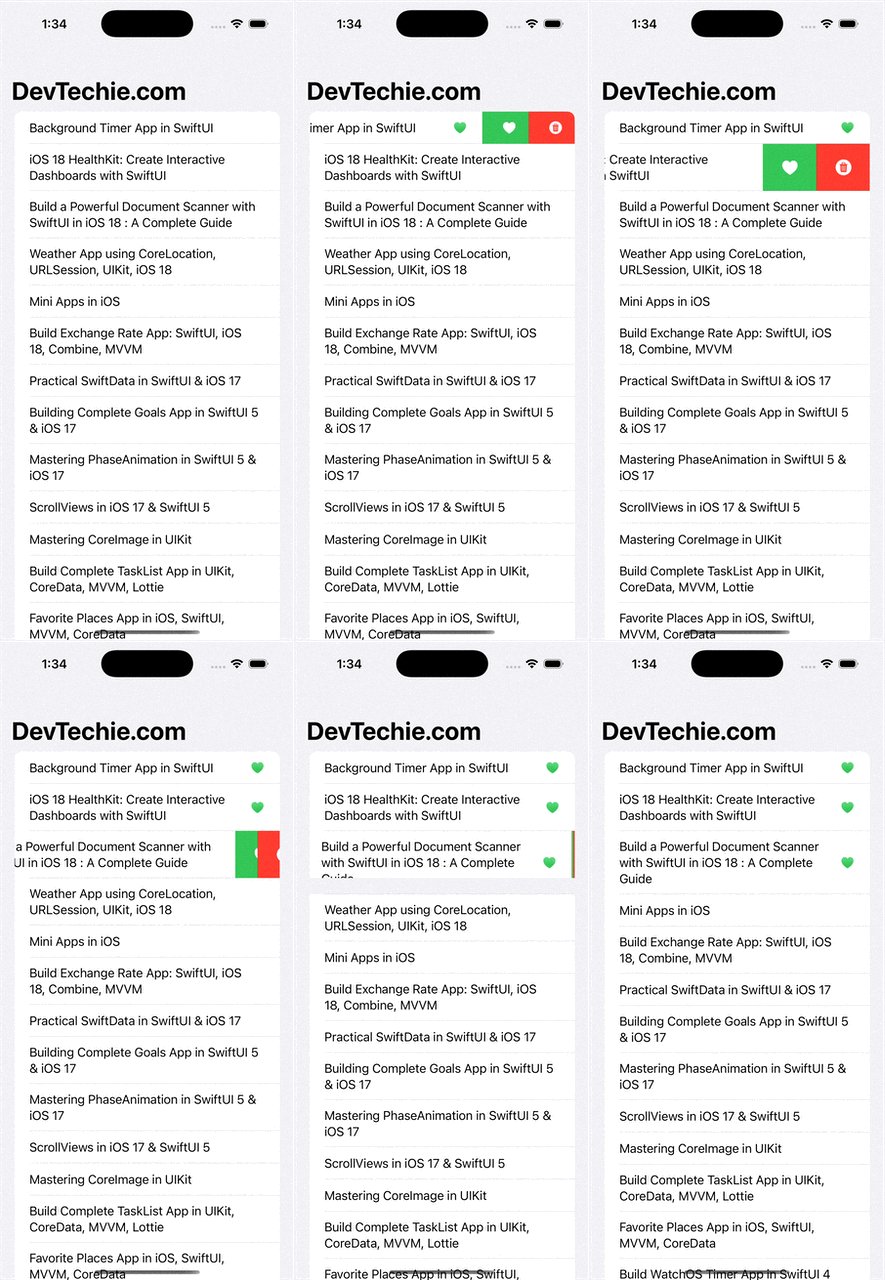
In this example, we only had a single action, but we can define multiple actions within the content closure to show multiple swipe actions.
Let’s add another button to favorite a course. We will modify the Course model to accommodate this change by adding a new property called isFavorite.
struct Course: Identifiable, Hashable {
    let id = UUID()
    var name: String
    var price: String
    var lessons: Int
    var isFavorite: Bool = false
}
Replace Text view inside the ForEach view with HStack to show an image view.
HStack {
    Text(course.name)
    Spacer()
    if course.isFavorite {
        Image(systemName: "heart.fill")
            .foregroundStyle(.green.gradient)
    }
}
Add another swipe action below the delete button.
.swipeActions {
    Button(role: .destructive) {
        if let index = courses.firstIndex(of: course) {
            courses.remove(at: index)
        }
    } label: {
        Label("Delete", systemImage: "trash.circle.fill")
    }

    Button {
        if let index = courses.firstIndex(of: course) {
            courses[index].isFavorite.toggle()
        }
    } label: {
        Label(course.isFavorite ? "Unfavorite" : "Favorite",
              systemImage: course.isFavorite ? "heart.slash.fill" : "heart.fill")
    }
    .tint(.green)
}
Complete code:
struct SwipeActionsExample: View {
    @State private var courses = Course.courses
    var body: some View {
        NavigationView {
            List {
                ForEach(courses) { course in
                    HStack {
                        Text(course.name)
                        Spacer()
                        if course.isFavorite {
                            Image(systemName: "heart.fill")
                                .foregroundStyle(.green.gradient)
                        }
                    }
                    .swipeActions {
                        Button(role: .destructive) {
                            if let index = courses.firstIndex(of: course) {
                                courses.remove(at: index)
                            }
                        } label: {
                            Label("Delete", systemImage: "trash.circle.fill")
                        }

                        Button {
                            if let index = courses.firstIndex(of: course) {
                                courses[index].isFavorite.toggle()
                            }
                        } label: {
                            Label(course.isFavorite ? "Unfavorite" : "Favorite",
                                  systemImage: course.isFavorite ? "heart.slash.fill" : "heart.fill")
                        }
                        .tint(.green)
                    }
                }
            }
            .navigationTitle("DevTechie.com")
        }
    }
}
Since the fullSwipe property remains true, user can still delete item by completing the swipe, we can modify the behavior by passing allowsFullSwipe value to false.
.swipeActions(allowsFullSwipe: false) 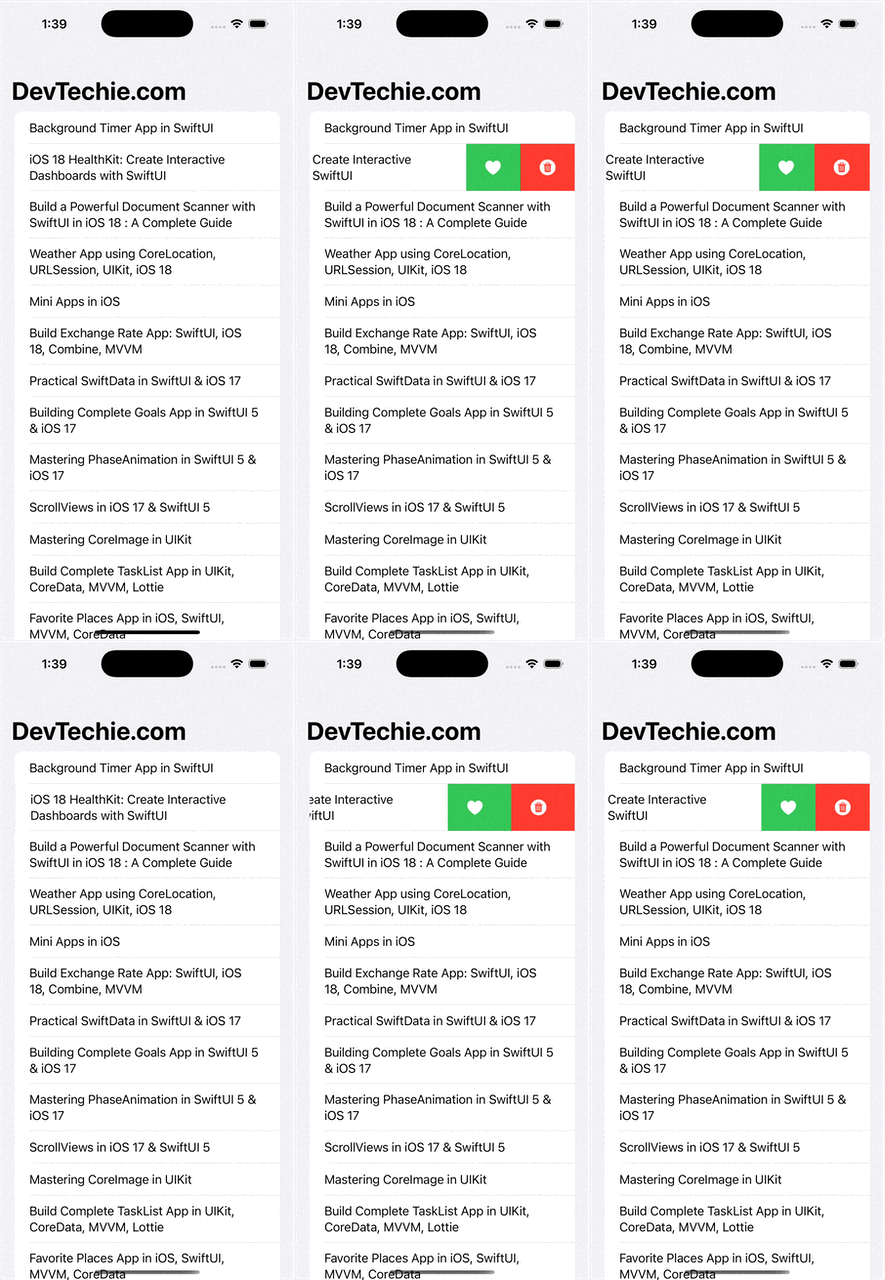
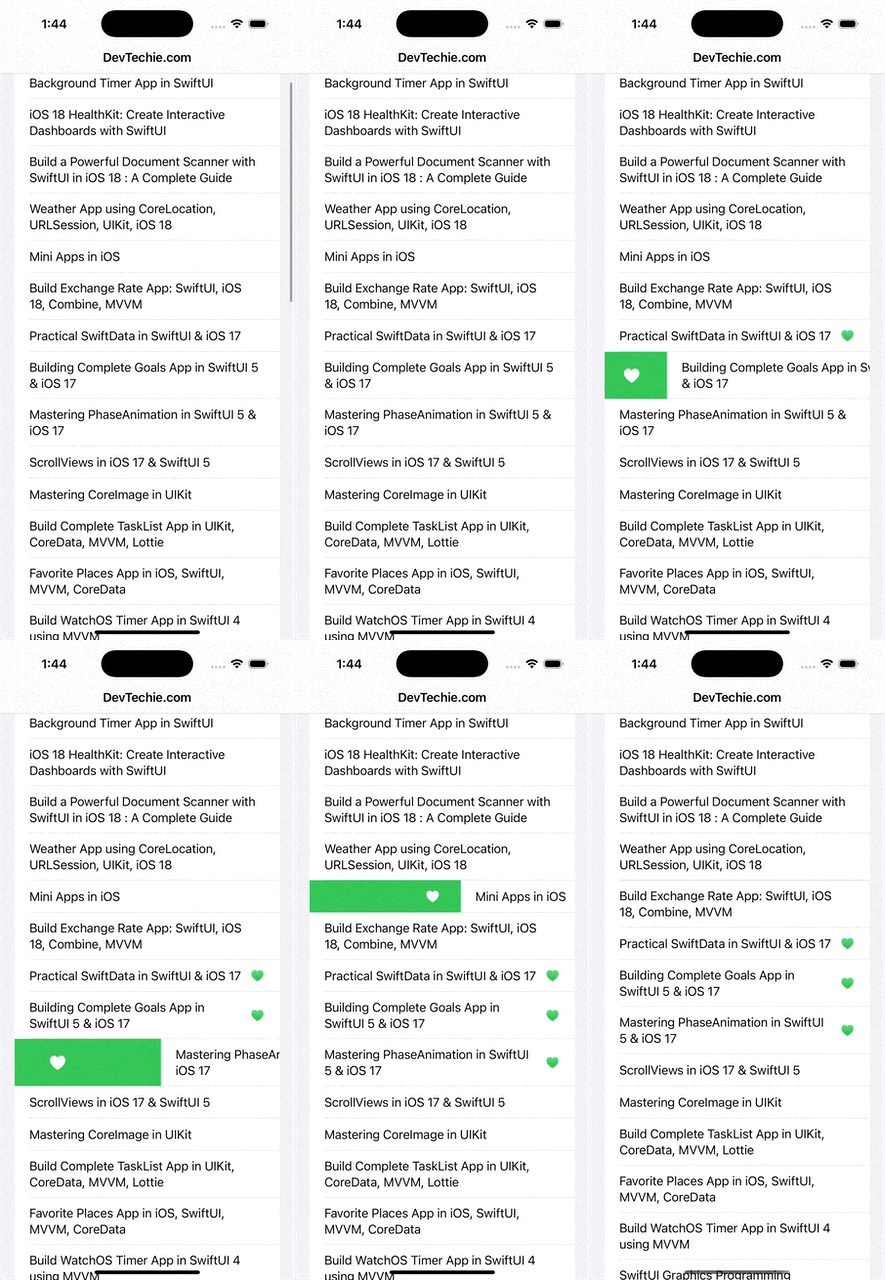
By default, SwipeActions applies to the trailing edge. We can specify the edge using the edge parameter.
Let’s modify the example to demonstrate the leading edge with a favorite button and the trailing edge with a delete button.
.swipeActions(edge: .trailing) {
    Button(role: .destructive) {
        if let index = courses.firstIndex(of: course) {
            courses.remove(at: index)
        }
    } label: {
        Label("Delete", systemImage: "trash.circle.fill")
    }
}
.swipeActions(edge: .leading) {
    Button {
        if let index = courses.firstIndex(of: course) {
            courses[index].isFavorite.toggle()
        }
    } label: {
        Label(course.isFavorite ? "Unfavorite" : "Favorite",
              systemImage: course.isFavorite ? "heart.slash.fill" : "heart.fill")
    }
    .tint(.green)
}
The delete action is destructive, so it makes sense to present a confirmation alert to ensure the user’s intention to delete the record. Let’s update the example to include the alert for the course being deleted.
We will add two State properties
    @State private var showAlert = false
    @State private var selectedCourse: Course?
Add alert modifier to display the confirmation dialog
struct SwipeActionsExample: View {
    @State private var courses = Course.courses
    @State private var showAlert = false
    @State private var selectedCourse: Course?
    var body: some View {
        NavigationView {
            List {
                ForEach(courses) { course in
                    HStack {
                        Text(course.name)
                        Spacer()
                        if course.isFavorite {
                            Image(systemName: "heart.fill")
                                .foregroundStyle(.green.gradient)
                        }
                    }
                    .swipeActions(edge: .trailing) {
                        Button(role: .destructive) {
                            selectedCourse = course
                            showAlert = true
                        } label: {
                            Label("Delete", systemImage: "trash.circle.fill")
                        }

                    }
                    .swipeActions(edge: .leading) {
                        Button {
                            if let index = courses.firstIndex(of: course) {
                                courses[index].isFavorite.toggle()
                            }
                        } label: {
                            Label(course.isFavorite ? "Unfavorite" : "Favorite",
                                  systemImage: course.isFavorite ? "heart.slash.fill" : "heart.fill")
                        }
                        .tint(.green)
                    }
                }
            }
            .alert("Confirm Deletion", isPresented: $showAlert, presenting: selectedCourse) { course in
                Button("Cancel", role: .cancel) {}
                Button("Delete", role: .destructive) {
                    if let index = courses.firstIndex(of: course) {
                        courses.remove(at: index)
                    }
                }
            } message: { course in
                Text("Are you sure you want to delete '\(course.name)'?")
            }
            .navigationTitle("DevTechie.com")
        }
    }
}
Notice the flicker effect where the row appears to be deleted before the confirmation dialog is presented, only to reappear since the user hasn’t performed the delete action yet. This occurs because SwiftUI optimistically animates the row out on a Button with the role of .destructive, even if no deletion has happened yet. Since we show an alert first and don’t delete immediately, SwiftUI assumes the row is gone, only to realize it’s not — hence the flash. We can fix this with the use of a non-destructive swipe button, and control the deletion manually after confirmation. This avoids the auto-removal animation triggered by .destructive. To enhance the user experience, we will add a red tint to the button and wrap the actual delete operation within the WithAnimation block. This will ensure a smooth transition throughout the process.
struct SwipeActionsExample: View {
    @State private var courses = Course.courses
    @State private var showAlert = false
    @State private var selectedCourse: Course?
    var body: some View {
        NavigationView {
            List {
                ForEach(courses) { course in
                    HStack {
                        Text(course.name)
                        Spacer()
                        if course.isFavorite {
                            Image(systemName: "heart.fill")
                                .foregroundStyle(.green.gradient)
                        }
                    }
                    .swipeActions(edge: .trailing) {
                        Button {
                            selectedCourse = course
                            showAlert = true
                        } label: {
                            Label("Delete", systemImage: "trash.circle.fill")
                        }
                        .tint(.red)
                    }
                    .swipeActions(edge: .leading) {
                        Button {
                            if let index = courses.firstIndex(of: course) {
                                courses[index].isFavorite.toggle()
                            }
                        } label: {
                            Label(course.isFavorite ? "Unfavorite" : "Favorite",
                                  systemImage: course.isFavorite ? "heart.slash.fill" : "heart.fill")
                        }
                        .tint(.green)
                    }
                }
            }
            .alert("Confirm Deletion", isPresented: $showAlert, presenting: selectedCourse) { course in
                Button("Cancel", role: .cancel) {}
                Button("Delete", role: .destructive) {
                    withAnimation {
                        if let index = courses.firstIndex(of: course) {
                            courses.remove(at: index)
                        }
                    }
                }
            } message: { course in
                Text("Are you sure you want to delete '\(course.name)'?")
            }
            .navigationTitle("DevTechie.com")
        }
    }
}
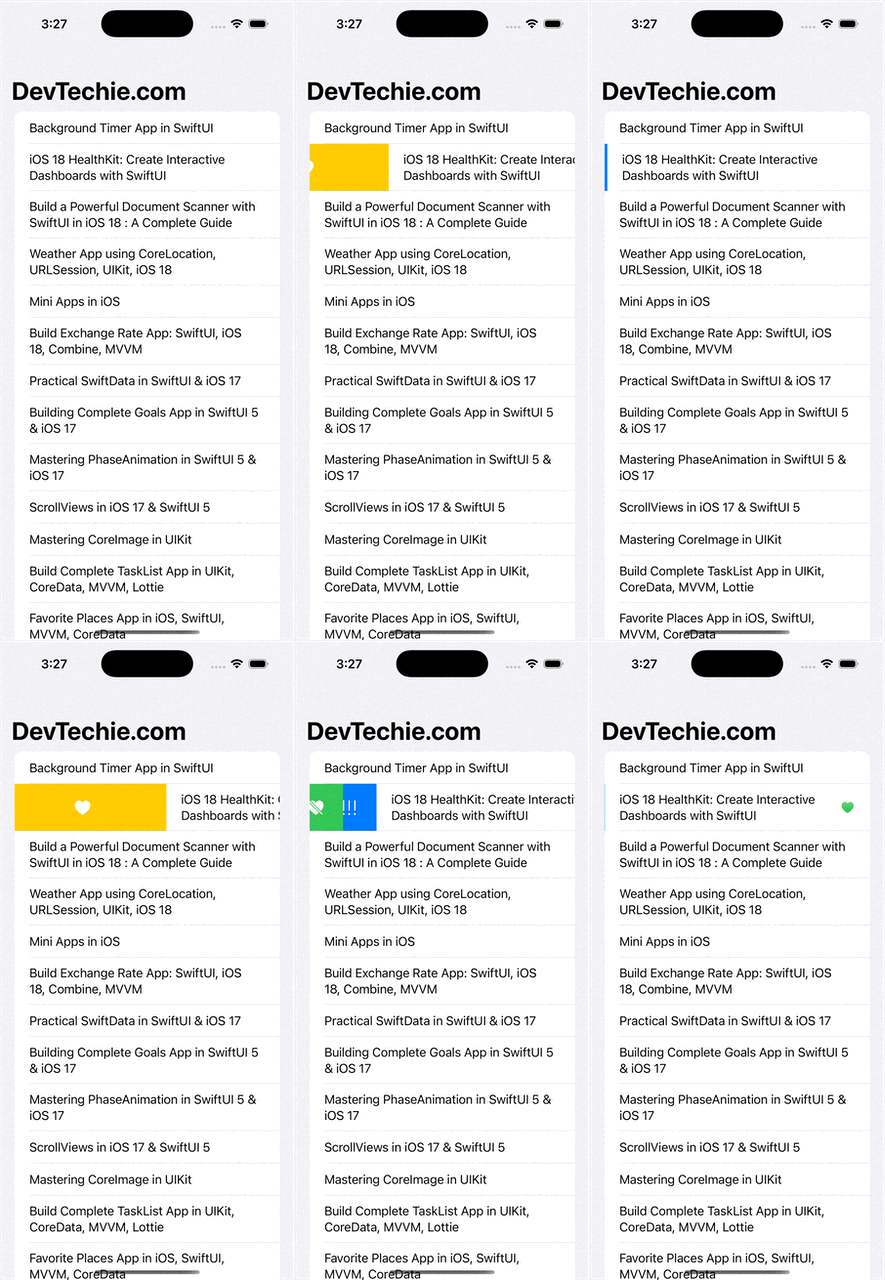
Since swipeActions accepts a content closure, we can also add conditions to it, which gives us the opportunity to present conditional action buttons.
We’ll add a new button to set course priority. This button will only be visible if the course has been added as a favorite.
struct SwipeActionsExample: View {
    @State private var courses = Course.courses
    @State private var showAlert = false
    @State private var selectedCourse: Course?
    var body: some View {
        NavigationView {
            List {
                ForEach(courses) { course in
                    HStack {
                        Text(course.name)
                        Spacer()
                        if course.isFavorite {
                            Image(systemName: "heart.fill")
                                .foregroundStyle(.green.gradient)
                        }
                    }
                    .swipeActions(edge: .trailing) {
                        Button {
                            selectedCourse = course
                            showAlert = true
                        } label: {
                            Label("Delete", systemImage: "trash.circle.fill")
                        }
                        .tint(.red)
                    }
                    .swipeActions(edge: .leading) {
                        if course.isFavorite {
                            Button {
                                if let index = courses.firstIndex(of: course) {
                                    courses[index].isFavorite.toggle()
                                }
                            } label: {
                                Label("Unfavorite",
                                      systemImage: "heart.slash.fill")
                            }
                            .tint(.green)

                            Button {
                               // course priority action
                            } label: {
                                Label("Priority",
                                      systemImage: "exclamationmark.3")
                            }
                            .tint(.blue)
                        } else {
                            Button {
                                if let index = courses.firstIndex(of: course) {
                                    courses[index].isFavorite.toggle()
                                }
                            } label: {
                                Label("Favorite",
                                      systemImage: "heart.fill")
                            }
                            .tint(.yellow)
                        }

                    }
                }
            }
            .alert("Confirm Deletion", isPresented: $showAlert, presenting: selectedCourse) { course in
                Button("Cancel", role: .cancel) {}
                Button("Delete", role: .destructive) {
                    withAnimation {
                        if let index = courses.firstIndex(of: course) {
                            courses.remove(at: index)
                        }
                    }
                }
            } message: { course in
                Text("Are you sure you want to delete '\(course.name)'?")
            }
            .navigationTitle("DevTechie.com")
        }
    }
}
Conclusion
SwipeActions is a powerful feature that enhances the user experience by providing intuitive, space-efficient contextual actions for list items. By following the examples and best practices in this article, we can implement SwipeActions effectively in our SwiftUI applications.
Remember to use SwipeActions judiciously — they should enhance, not complicate, the user experience. By keeping actions relevant, clear, and consistent with iOS design guidelines, you’ll create a polished and professional interface for your app.
Are you interested in learning machine learning using SwiftUI and iOS? If so, check out our new book: Mastering Machine Learning in iOS with SwiftUI: From Basics to Advanced.
Mastering Machine Learning in iOS with SwiftUI: From Basics to Advanced
This hands-on guide covers Create ML, Core ML, Vision, helping you build AI-powered apps effortlessly. Learn to train…www.devtechie.com
Visit us at https://www.devtechie.com