- Dec 16, 2024
Custom Exceptions in Python
- DevTechie
- Python
Exception handling is a bliss since this won’t let your program crash. This article explores how to define custom or user-defined exceptions in Python.
Why custom exceptions?
With Python’s wide number of built-in exceptions, it is likely that you’ll be able to pick a suitable exception based on your application needs. However, occasionally your code does not match the mold.
The major limitation of Python’s built-in exceptions is that they may not always meticulously reflect the errors pertaining to your application. For example, Python has no built-in exceptions to represent scenarios such as “Invalid Marks or Invalid Grade” in a learning management system or “Unauthorized Machine or Unauthorized IP address” in a mission critical application.
Python’s built-in exceptions are generic in nature, and hence do not represent domain specific or application specific errors situations.
Using built-in exceptions for such scenarios may invite the following issues:
1 — Difficult debugging
When you use a generic exception like NameError, TypeError or ValueError, it’s not immediately evident what type of errors occurred unless you look at the error message or dive into the code.
2 — Less readability and understandability
The semantic meaning of errors is not clear i.e. what went wrong in the context of your program is not clear while using built-in exceptions. This makes the code difficult to understand.
You may have to use the same built-in exceptions for multiple types of errors which again affects the semantic meaning of errors in the context of an application or specific domain.
Although Python’s built-in exceptions canvas is very large to depict an extensive array of error scenarios, they have limitations.
Custom (user defined) exception classes in Python allow you to define your own exceptions tailored to your application’s needs.
Python makes it easy to create custom exception types by inheriting from a built-in exception class. This form of exception is known as a user-defined or customized exception.
Python custom exceptions are very helpful for defining a specific set of error conditions that are relevant to your application.
In Python, you normally build a custom exception by inheriting from “Exception” class or one of its sub-classes such as the “TypeError” class. The Exception serves as the root class for the majority of built-in Python exceptions. You may alternatively inherit from a different exception, although typically Exception is the best option.
The new exception class must be a subclass (derived) either directly or indirectly from the built-in class Exception. Most of the built-in exceptions are also the subclass of “Exception” class. This is represented schematically in the below picture.
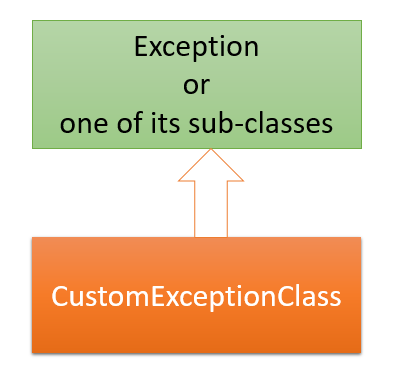
Defiing a custom exception
In Python, you can create your own custom exceptions to handle specific scenarios.
Example
Basic Example
A basic custom exception can be defined as follows:
class CustomException(Exception):
    pass
In this example, CustomException is a user-defined exception that extends the Exception class.
Once you have defined a custom exception, you can raise it like any built-in Python exception:
Code:
class CustomError(Exception):
    pass

try:
    raise CustomError("This is a user-defined exception")

except CustomError as e:
    print(e)
Output:
This is a user-defined exceptionExample 2:
Suppose you want to create an exception which forces the user to input marks between 0 and 100 else raises an exception. The code below does just do that.
# define the custom exception class as a sub-class of Exception class
class InvalidMarksException(Exception):
    """Raised when the marks is not between 0 and 100"""
    pass

try:
    marks = eval( input ( "Enter the marks: "))
    if (marks < 0 ):
        raise InvalidMarksException("Marks can not be less than 0. Min Marks is 0")
    elif (marks > 100):
        raise InvalidMarksException("Marks can not be more than 100. Max marks is 100")

    else:
        print ("Your input is accepted")
except InvalidMarksException as e:
    print(e)
Outputs:
Enter the marks: -45
Marks can not be less than 0. Min Marks is 0
Enter the marks: 89
Your input is acceptedEnter the marks: 101
Marks can not be more than 100. Max marks is 100Adding Custom Behavior to exception
If you want your custom exception to carry additional information (such as an error message or other relevant data), you can add your own attributes to the custom exception class and override the constructor (__init__()) method. You also need to call constructor of Exception class using super.__init__().
The below code demonstrates this.
Code:
# custom exception class definition
class MarksNotInRangeError(Exception):
    """Exception raised when the marks is not between 0 and 100
    Attributes:
        marks -- stores the marks
        message -- explanation of the error
    """
    def __init__(self, marks):
        self.marks = marks
        self.message = f"Your input is {self.marks}. Marks are not in (0, 100) range"
        super().__init__(self.message)

# The definition of custom exception class ends here

# usage of above defined exception
try:
    marks = int ( input ( "Enter the marks: "))
    if not 0 < marks < 100:
        # raise the custom exception
        raise MarksNotInRangeError(marks)

except MarksNotInRangeError as e:
    print(f"Invalid input: {e}")
else:
        print ("Your input is accepted")
Output:
Enter the marks: -89
Invalid input: Your input is -89. Marks are not in (0, 100) range
Enter the marks: 58
Your input is acceptedEnter the marks: 102
Invalid input: Your input is 102. Marks are not in (0, 100) rangeThe custom exception class MarksNotInRangeError(Exception) has two instance attributes — marks and message. The message instance attribute is the custom error message which will be displayed to the user upon exception.
The overridden the constructor method — __init__() of the custom exception class MarksNotInRangeError(Exception)accepts a single argumentmarks . It also defines another instance attribute — message which uses marks instance to create the error message. Then, the constructor of the parent Exception class is called explicitly with the self.message argument using super().
If the user enters course marks outside the specified range, the custom exception will be raised using the raise statement via the line raise MarksNotInRangeError(marks) and the appropriate message will be displayed to the user as shown in the above outputs.
Use custom exceptions wisely!
Do not define custom exceptions just because Python allows this and you can do it. Use it when their usage makes your code readable, maintainable and reliable. Below are some thumb rules for using custom exceptions:
Peculiar Application Errors conditions
You should always look for Python’s built-in exceptions to represent your error conditions. However, if your application has some intrinsic errors which cannot be represented using Python’s built-in exceptions, then you can go for defining your own application specific exceptions.
API and library development
If you are writing a library/package or API to be used in different projects by other developers, then defining custom exceptions will enhance the readability, understandability, maintainability and useability of your library/API.
Need for an exception hierarchy
When your library/API requires to define many exceptions which can be grouped in a hierarchical relationship. You can define custom exceptions using inheritance to define required custom exceptions. For example, if you are a user registration module/API; there may be numerous situations which lead to non-registration of user such as password does not qualify password rules, username is already taken, invalid email address given etc. Here, you can define a base custom exception class which is a sub-class of Python’s Exception class, let’s say this class — RegistrationFailed. Afterwards, you can use RegistrationFailed exception class as a super-class (base-class) for defining custom exceptions such as PasswordDoesNotMatchPolicy, InvalidEmail, UsernameAlreadyExistto specify reasons for failed registration.
You should use descriptive names suffixed with Exception with CamelCase naming conventions to name your custom exceptions classes.
Recapitulate
Custom exceptions enhance error handling by providing clear communication about what went wrong and why. They are raised with the aid of the raise statement explicitly. You can further add custom behavior to custom exceptions based on your application specific requirements using OOP concepts. Hope! You enjoyed reading the article. Happy Coding.